The Garage Guide
Updated April 2026 · 15 min read
How to Make Your Garage Door Opener Smart: 2026 Retrofit Guide
Add WiFi, HomeKit, and voice control to your existing opener for $36 to $220 in under an hour.
TL;DR
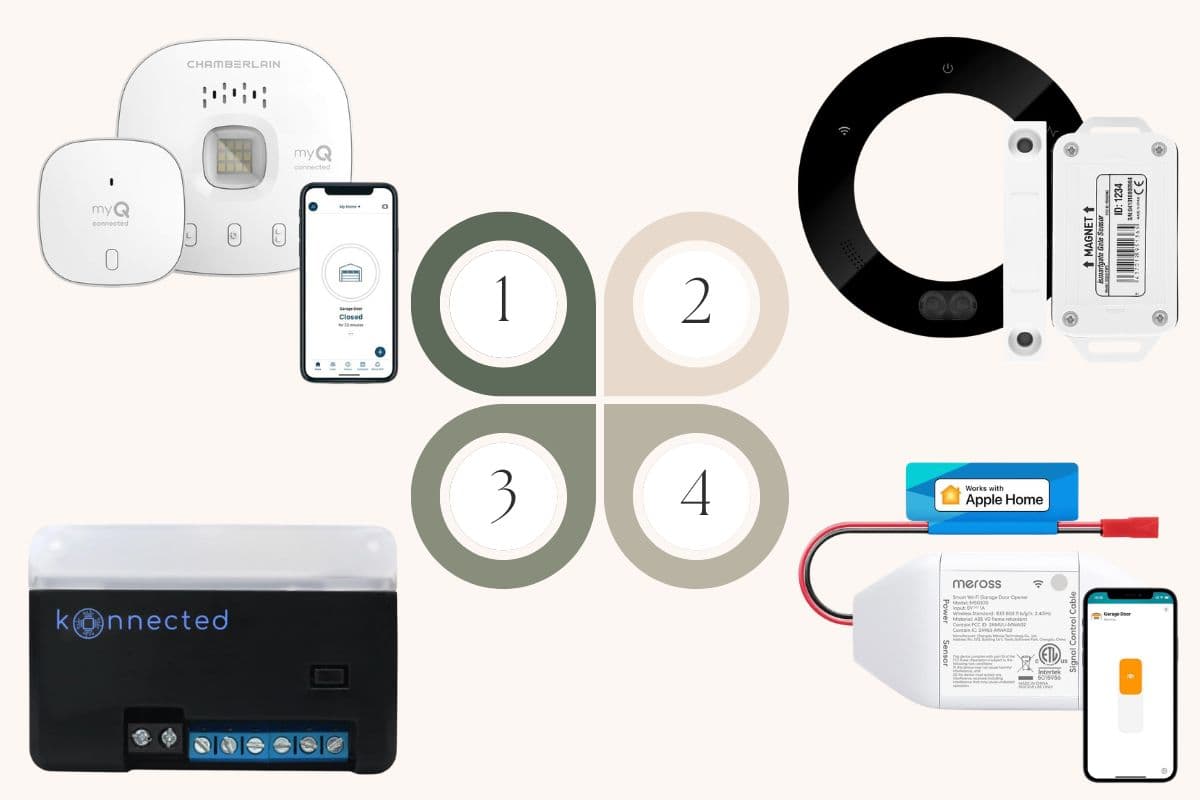
A smart garage door retrofit costs $36 to $220 and takes 15 to 45 minutes to install. You do not need to replace your opener. The right product depends on one question: does your opener have a standard learn button on the back of the motor unit? If yes, the Konnected blaQ gives you local control with HomeKit, Home Assistant, and Alexa without a cloud subscription. If you want the simplest setup and do not mind the myQ app, the Chamberlain MYQ-G0401 is the official route. For older openers, other brands, or HomeKit on any opener, the Meross MSG100HK handles single doors for under $75. For multi-door homes or if you want to integrate IP cameras with your garage system, the iSmartgate PRO controls up to three doors from a single hub.
The Learn Button Test
Critical Decision Rule
Before buying anything, look at the back of your garage door opener motor unit. Find the learn button. It is a small colored square or round button near the antenna wire, usually labeled "LEARN." The color tells you what will work.
| Learn Button Color | What It Means | Retrofit Options |
|---|---|---|
| Yellow (round) | Security+ 2.0 (most common 2011 to 2024) | myQ (with caveats), Konnected blaQ, or universal contact-closure with switch adaptor |
| Red, orange, purple, brown, blue | Security+ 1.0 or 2.0 (1997 to 2011) | myQ, Konnected blaQ, or universal contact-closure |
| White (2025 and newer) | Security+ 3.0 | Universal contact-closure with switch adaptor only (myQ and blaQ not compatible) |
| Green | Pre-1997 rolling code | Universal contact-closure only |
| No learn button visible | Very old or non-Chamberlain brand | Universal contact-closure only |
| Genie, Linear, Marantec, other | Non-Chamberlain protocols | Universal contact-closure only |
If your opener was installed before 1993, replace it instead of retrofitting. Pre-1993 openers lack modern safety sensors and reversing mechanisms that are required by current code.
Why Retrofit Instead of Replace
A typical garage door opener lasts 15 to 20 years. The mechanical components (motor, belt or chain, gears) almost always outlive the electronics. If your opener works reliably but lacks WiFi, adding a retrofit hub gets you 90% of what a new smart opener offers for a fraction of the cost.
| Option | Cost | Time Required | What You Get |
|---|---|---|---|
| Full opener replacement | $240 to $540 plus install | 4 to 6 hours | New motor, new remotes, new smart features, warranty |
| Retrofit hub | $36 to $220 | 15 to 45 minutes | Smart features on existing opener |
| DIY contact-closure only | $30 to $60 | 30 minutes | Basic open and close control, no advanced features |
Retrofit makes sense when your current opener runs quietly, reverses properly on the safety sensors, and holds the door tight when closed. If your opener grinds, skips, or struggles with a standard door, the mechanical components are worn and a retrofit is not the right answer. See our best garage door openers 2026 review for full replacement picks.
How Smart Garage Retrofits Work
There are three technical approaches. Understanding the difference helps you pick the right product for your situation.
Approach 1: Manufacturer-Native Hubs
The hub pairs wirelessly with your opener using the same rolling-code protocol your remote uses. No wiring required. The opener must be Chamberlain, LiftMaster, or Craftsman with a compatible learn button color. This is the simplest setup, but it locks you into the manufacturer's app ecosystem.
Example: Chamberlain MYQ-G0401 Smart Garage Hub.
Approach 2: Universal Contact-Closure Kits
A small WiFi hub wires to the same two terminals on your opener that your wall button uses. When the app sends a command, the hub briefly closes the circuit, which tells the opener to activate. A separate tilt sensor mounted on the garage door reports whether the door is open or closed. Works on virtually any opener regardless of age or brand.
Examples: Meross MSG100HK, iSmartgate PRO.
Approach 3: Local-Control Alternatives
Devices that speak directly to the opener's native smart protocol but bypass the manufacturer's cloud service. Control stays on your home network. Works with open-source smart home platforms.
Example: Konnected blaQ. It uses the same Security+ 2.0 protocol as myQ to communicate with your garage door opener, without the myQ app or cloud service.
Which Approach Is Right for You
| If You Want | Choose |
|---|---|
| Simplest setup, compatible Chamberlain or LiftMaster opener | Chamberlain MYQ-G0401 |
| Apple HomeKit support, single door, any opener | Meross MSG100HK |
| Apple HomeKit support, Chamberlain with Security+ 2.0 | Konnected blaQ |
| Local control, no cloud dependency | Konnected blaQ with Home Assistant |
| Multi-door home (2 or 3 doors), any brand | iSmartgate PRO |
| IP camera integration with your garage system | iSmartgate PRO |
Compatibility Matrix: Will Your Opener Work?
| Opener Brand | Year Range | Learn Button | Best Retrofit Option |
|---|---|---|---|
| Chamberlain / LiftMaster / Craftsman | 2011 to 2024 | Yellow | Konnected blaQ (recommended) or universal contact-closure with switch adaptor |
| Chamberlain / LiftMaster | 2025 and newer | White (Security+ 3.0) | Universal contact-closure with switch adaptor only |
| Chamberlain / LiftMaster | 1997 to 2011 | Red, orange, purple, brown | myQ, blaQ, or universal |
| Chamberlain / LiftMaster | 1993 to 1997 | Green | Universal contact-closure only |
| Genie | Any age | Varies | Aladdin Connect or universal contact-closure |
| Craftsman (sold by Sears) | 1993 and newer | Varies | Check learn button color, then match row above |
| Linear | Any age | N/A | Universal contact-closure only |
| Marantec | Any age | Blue (not Security+) | Universal contact-closure only |
| Overhead Door / Wayne Dalton | Any age | Varies | Universal contact-closure only |
| No visible learn button | Pre-1993 | N/A | Replace opener, do not retrofit |
Important compatibility note on the Chamberlain MYQ-G0401: The Chamberlain hub does not work with Chamberlain Group openers that have a yellow learn button manufactured between 2010 and 2021. For those openers, the Konnected blaQ or a universal contact-closure kit is the better choice. The myQ hub also does not work with openers where the photoelectric safety sensors change power mode when the door closes, or with Linear-branded openers.
Switch adaptor note for universal hubs: The Meross MSG100HK and iSmartgate PRO both require a separate switch adaptor accessory for Chamberlain, Craftsman, and LiftMaster openers with yellow learn buttons. Most manufacturers ship this accessory for free when you contact support with your opener details. Build the extra 3 to 5 day shipping time into your installation plan if your opener falls in this category.
The 4 Best Smart Garage Retrofit Options
1. Chamberlain MYQ-G0401 Smart Garage Control
Best for: Chamberlain, LiftMaster, and Craftsman owners with compatible learn buttons who want the cheapest and simplest solution.
Price: $36 to $60
Compatibility: Most Chamberlain, LiftMaster, and Craftsman openers manufactured after 1993, with several important exceptions. Does not work with Security+ 3.0 openers (white learn button, 2025 and newer), Chamberlain Group openers with a yellow learn button manufactured between 2010 and 2021, openers where the photoelectric sensors change power mode when the door closes, or any Linear opener.
Setup time: 15 to 20 minutes.
| Spec | Detail |
|---|---|
| Install type | Wireless (no wiring to opener) |
| Smart platform | myQ app, Google Assistant, Amazon Alexa |
| HomeKit support | No |
| Local control | No (cloud-dependent) |
| Multi-door | No (one door per hub) |
| Subscription | Free tier sufficient for most users; Smart Access Pass is $1 per month for additional integrations |
| Warranty | 1 year |
Pros: Cheapest compatible option. Native manufacturer support. No wiring required. Works with existing myQ remotes and keypads. Compact modern design.
Cons: No HomeKit support at any price. Cloud-dependent (needs internet to function). Some advanced integrations require the paid Smart Access Pass. Has significant compatibility exclusions including the 2010 to 2021 yellow learn button gap.
Check Price on Amazon2. Konnected blaQ
Best for: Home Assistant users, HomeKit households, and anyone who wants local control without a cloud subscription.
Price: $90 to $120
Compatibility: Chamberlain, LiftMaster, and Craftsman openers with yellow, red, orange, blue, purple, or brown learn buttons. This includes most openers with myQ built in, including the 2010 to 2021 yellow learn button models that the official myQ hub does not support. Not compatible with Security+ 3.0 openers (white learn button, 2025 and newer).
Setup time: 20 to 30 minutes.
| Spec | Detail |
|---|---|
| Install type | Wired (three wires to opener motor unit) |
| Smart platform | Home Assistant, Hubitat, HomeSeer, Control4, SmartThings, Alexa |
| HomeKit support | Yes (via Home Assistant or HomeBridge) |
| Local control | Yes (works without internet) |
| Multi-door | No (one door per hub) |
| Subscription | None required; optional Konnected Cloud for remote access |
| Warranty | 1 year |
Pros: Fully local control without a cloud dependency. Works with Home Assistant natively. Open-source-friendly firmware based on ESPHome. No subscription. Bypasses myQ entirely while using the same underlying Security+ 2.0 protocol. Works with the exact Chamberlain openers the myQ hub excludes. Detects partial open states (not just open or closed).
Cons: Most expensive of the Chamberlain-only options. Best experience requires a Home Assistant or compatible hub (not ideal for complete beginners). Does not work with Security+ 3.0. HomeKit support requires a bridge.
Check Price on Amazon3. Meross MSG100HK Smart Garage Door Opener
Best for: HomeKit users with a single garage door and any brand of garage door opener.
Price: $42 to $72
Compatibility: Compatible with over 1,600 garage door opener models across 200+ brands using Security+ 1.0 and Security+ 2.0 protocols. Does not support Security+ 3.0. Chamberlain and LiftMaster openers work with an included or shipped accessory. Works on most Genie, Linear, Marantec, and other brand openers with standard wall button terminals.
Setup time: 25 to 35 minutes.
| Spec | Detail |
|---|---|
| Install type | Wired contact-closure plus wireless tilt sensor |
| Smart platform | Apple HomeKit, Google Home, Amazon Alexa, SmartThings, Siri, CarPlay |
| HomeKit support | Yes (native, no bridge required) |
| Local control | Partial (HomeKit works locally; other platforms cloud-dependent) |
| Multi-door | No (one door per hub) |
| Subscription | None |
| Warranty | 2 years |
Pros: Native HomeKit support at the lowest price of any option with HomeKit. Works on the broadest range of opener brands. Includes door position sensor. No subscription. Supports geofencing for automatic open on arrival. Works with Siri and Apple CarPlay.
Cons: Requires wiring to opener terminals (20 minutes of light DIY work). Tilt sensor is visible on the door. Only supports one door per hub. Does not support Security+ 3.0 openers.
Check Price on Amazon4. iSmartgate PRO
Best for: Homes with two or three garage doors, and homeowners who want IP camera integration with their garage door system.
Price: $150 to $220 (Ultimate PRO with included IP camera runs at the higher end of this range)
Compatibility: Compatible with all major garage door opener brands through its universal contact-closure wiring. Controls up to three garage doors from a single hub with the addition of extra wireless sensors. For Chamberlain, Craftsman, and LiftMaster openers with yellow learn buttons, the separate iSmartgate switch adaptor is required (available from the manufacturer).
Setup time: 35 to 50 minutes for a single door, plus 10 to 15 minutes per additional door.
| Spec | Detail |
|---|---|
| Install type | Wired hub plus wireless tilt sensor per door |
| Smart platform | Apple HomeKit, Google Home, Amazon Alexa, Samsung SmartThings, IFTTT |
| HomeKit support | Yes (native) |
| Local control | Partial (HomeKit works locally) |
| Multi-door | Yes (up to three doors per hub) |
| Subscription | None |
| Warranty | 2 years |
Pros: Only option in this roundup that handles multiple doors from one hub. Native HomeKit without requiring a bridge. Integrates with up to three existing IP cameras for visual confirmation of door status in the app. Supports multiple user accounts with time and location restrictions. GPS-based automatic open and close through IFTTT. Supports sectional and tilt garage doors.
Cons: Most expensive option in this roundup. Higher complexity setup. Yellow learn button Chamberlain openers require a separate switch adaptor that ships free on request but adds 3 to 5 days to your installation timeline. IFTTT integration was discontinued on October 1, 2025, so some automation scenes may need to be rebuilt using HomeKit or SmartThings.
Check Price on AmazonStep-by-Step Installation: Universal Contact-Closure Method
This is the most applicable method because it works on the widest range of openers. The steps below apply to Meross, iSmartgate, and most other universal contact-closure hubs.
Before You Start
Unplug the garage door opener from the ceiling outlet before doing any wiring. This is not optional. Working on a powered opener risks electric shock and accidental door movement.
Have ready: the smart hub, its included tilt sensor, a small Phillips screwdriver, a step ladder, and the opener's wall button manual if you have it (to identify terminal positions).
Unplug the Opener
Locate the ceiling outlet and unplug the opener motor unit. Wait 30 seconds for any capacitors to discharge.
Identify the Wall Button Terminals
On the motor unit, find the two terminals where the wires from your wall button connect. These are typically labeled "1" and "2" or marked with symbols for button and common. The wires are usually red and white, or red and black.
Wire the Smart Hub in Parallel
Connect the smart hub's two wires to the same terminals as your wall button. Do not disconnect the wall button wires. The hub wires sit alongside them. This puts the hub "in parallel" with the wall button, meaning either one can trigger the door.
Most hubs include a screwdriver-free terminal block that opens with a small lever. Strip the wire ends if they are not already tinned, insert into the terminal, and close the lever.
Mount the Tilt Sensor
The tilt sensor tells the app whether the door is open or closed. Mount it on the top panel of the garage door, near the center, using the included adhesive or screws. The arrow on the sensor should point straight up when the door is closed.
Placement matters. If the sensor is on the wrong panel or at the wrong angle, the app will show inaccurate status. Most installation problems trace back to a sensor mounted poorly, not a hardware defect.
Power the Opener and Hub
Plug the opener back into its ceiling outlet. Plug the smart hub into a nearby outlet. Most hubs include a power adapter with a 6 to 10 foot cord.
Connect to WiFi
Download the hub's app, create an account, and follow the in-app setup. You will connect the hub to your 2.4 GHz WiFi network. Most smart garage hubs do not support 5 GHz networks because WiFi penetration through metal opener housings is better at 2.4 GHz.
If your router broadcasts a single SSID for both bands, you may need to temporarily split them in your router settings to connect the hub, then recombine after setup.
Test and Calibrate
Trigger the door from the app and watch it open. Confirm the app reports "open" when open and "closed" when closed. If the status reading is reversed or inaccurate, recalibrate the tilt sensor in the app or remount it at the correct angle.
Test the wall button still works. It should, because you wired the hub in parallel and did not disconnect the button.
The myQ Subscription: What Is Free vs Paid
Chamberlain's myQ service has a free tier and a paid Smart Access Pass. The line between them has shifted over the years and confuses many users.
Free with myQ
- Open and close from the app
- Real-time alerts when the door opens or closes
- Scheduled open and close times
- Shared access for family members (up to 3 users)
- Basic voice control through Google Assistant and Amazon Alexa
Paid (Smart Access Pass, $1/month or $10/year)
- Amazon Key in-garage delivery integration
- IFTTT routines and triggers
- Select partner integrations (Tesla HomeLink Connect, some insurance telematics programs)
Honest take: Free myQ covers what most homeowners actually need. The paid tier matters only if you specifically want Amazon in-garage delivery or IFTTT automation. If your goal is Apple HomeKit integration, myQ does not offer it at any price tier. Choose Meross MSG100HK, Konnected blaQ, or iSmartgate PRO instead.
Security Considerations for Smart Garage Retrofits
A smart garage door hub is a new attack surface on your home network. Three real risk categories matter.
Cloud service breaches
If the manufacturer's cloud service gets compromised, cloud-dependent hubs (myQ, some iSmartgate features) are at least theoretically exposed. This has happened to several IoT vendors over the past decade, though no known breach has resulted in mass garage door attacks. Local-control options like Konnected blaQ in Home Assistant mode avoid this risk entirely because they do not send data to any cloud.
Network security
Any WiFi device creates a potential entry point for network attacks if the device firmware has vulnerabilities. Put smart garage hubs on a separate IoT VLAN if your router supports it. This isolates IoT devices from your main network where financial apps and personal devices live.
Physical security
A hacked smart garage is theoretically possible. In practice, most residential break-ins happen through unlocked doors, ground-floor windows, or unattended open garages. A smart garage retrofit does not meaningfully increase your risk compared to a standard garage door. Do not over-weight this concern when picking a product.
When Retrofit Is Not the Right Answer
A retrofit hub does not fix a failing opener. If any of the following apply, replace the opener instead of retrofitting it.
- ✕The opener grinds, skips, or struggles to lift the door
- ✕The belt or chain is frayed, stretched, or visibly damaged
- ✕The opener is older than 20 years
- ✕Safety sensors do not reliably reverse the door
- ✕The opener hums but does not move the door
- ✕The wall button works intermittently
In all of these cases, see our best garage door openers 2026 review for replacement picks. For specific mechanical issues, see garage door opener not working for diagnosis before spending on either a retrofit or replacement.
Related Guides
Best Garage Door Openers 2026
Full replacement picks if your opener needs more than a smart retrofit.
Best Garage Door Keypads
Wireless keypads for keyless entry alongside or instead of smart app control.
Garage Door Opener Not Working?
Diagnose mechanical and electrical issues before deciding between retrofit and replacement.
Garage Workshop Setup
Plan your garage workshop with smart access as part of the connected workspace.
Frequently Asked Questions
Do I need to replace my garage door opener to make it smart?
No, you do not need to replace your garage door opener to add smart features. A smart garage door retrofit hub costs $36 to $220 and adds WiFi control, smartphone access, real-time open and close alerts, and voice control to almost any existing garage door opener manufactured after 1993. You only need to replace the garage door opener if the motor, belt, chain, or mechanical components are failing. Adding smart features alone is not a reason to replace a working opener.
Does the Chamberlain myQ app require a monthly subscription?
No, the Chamberlain myQ app does not require a monthly subscription for basic smart garage door features. The free myQ tier handles opening and closing the garage door from the app, real-time alerts, scheduling, family member sharing, and voice control through Google Assistant and Amazon Alexa. Chamberlain offers a paid Smart Access Pass at $1 per month or $10 per year that adds Amazon Key in-garage delivery and IFTTT integration, but most homeowners do not need the paid tier. Note that Chamberlain myQ does not support Apple HomeKit at any price.
Can I control my garage door with Apple HomeKit without buying a new garage door opener?
Yes, you can add Apple HomeKit control to an existing garage door opener by installing a smart retrofit hub that natively supports HomeKit. Three products add HomeKit to existing garage door openers in 2026: the Meross MSG100HK works on any brand of opener starting at around $42 for a single door, the Konnected blaQ works only on Chamberlain and LiftMaster openers with Security+ 2.0 (non-white learn buttons) and adds local control on top of HomeKit, and the iSmartgate PRO handles up to three doors from a single hub and includes IP camera integration. The Chamberlain myQ app does not support HomeKit at any price tier.
What is the learn button on a garage door opener?
The learn button on a garage door opener is a small colored button on the back of the opener motor unit, usually near the antenna wire, used to pair new remotes, keypads, and smart hubs with the opener. The color of the learn button identifies which communication protocol the opener uses, which determines retrofit compatibility. Yellow learn buttons indicate Security+ 2.0 (most common on Chamberlain, LiftMaster, and Craftsman openers from 2011 to 2024). White learn buttons indicate Security+ 3.0 (2025 and newer Chamberlain openers). Red, orange, purple, brown, or blue learn buttons indicate Security+ 1.0 or 2.0 (1997 to 2011). Green learn buttons indicate pre-1997 rolling code systems.
Does a smart garage door hub work without internet?
Whether a smart garage door hub works without internet depends on the specific product. The Konnected blaQ paired with Home Assistant keeps control fully local and continues to work without any internet connection. The Meross MSG100HK and iSmartgate PRO work locally for Apple HomeKit commands when used with an Apple home hub, but lose remote access outside the home network. The Chamberlain MYQ-G0401 requires an active internet connection for nearly all smart features. Regardless of which hub you install, the garage door's physical wall button and original remote always continue to work during internet outages.
Will the Chamberlain myQ hub work on a garage door opener with a yellow learn button?
Not always. The Chamberlain MYQ-G0401 Smart Garage Hub does not work with Chamberlain Group openers (Chamberlain, LiftMaster, and Craftsman branded) that have a yellow learn button and were manufactured between 2010 and 2021. This is a specific compatibility exclusion documented by the manufacturer. For garage door openers in that 2010 to 2021 yellow learn button window, the Konnected blaQ or a universal contact-closure kit such as the Meross MSG100HK (used with the included switch adaptor accessory) is the correct retrofit option. Yellow learn button Chamberlain openers made before 2010 or after 2021 are typically compatible with the myQ hub.
Can one smart hub control two or three garage doors?
Yes, the iSmartgate PRO smart garage door hub can control up to three garage doors from a single hub by adding extra wireless tilt sensors (sold separately by the manufacturer). The Chamberlain MYQ-G0401, Meross MSG100HK, and Konnected blaQ each support only one garage door per hub, so a two-door garage using those products requires two separate hubs. For homes with two or three garage doors and a preference to consolidate control in one app, the iSmartgate PRO is the only option in the under-$250 price range that handles multi-door setups from a single unit.
Will a smart garage retrofit work on a 20-year-old garage door opener?
A smart garage retrofit will probably work on a 20-year-old garage door opener, provided the opener was manufactured after 1993 and has a learn button. Garage door openers made before 1993 lack modern safety sensors required by current building code and should be replaced rather than retrofitted. For older openers that do qualify, universal contact-closure retrofit hubs like the Meross MSG100HK or iSmartgate PRO work regardless of learn button color because they wire into the same terminals as the wall button. The Chamberlain myQ hub and Konnected blaQ do not work with green learn button openers (pre-1997), but universal hubs do.
What happens to a smart garage door opener when WiFi goes down?
When WiFi goes down, the garage door's original wall button and handheld remote continue to work normally because they use radio frequency signaling that does not depend on internet or WiFi. The smart features of the retrofit hub (app control, voice control through Alexa or Google, automatic open and close alerts) become unavailable until WiFi returns. One exception: the Konnected blaQ in Home Assistant mode continues to work for local smart home commands as long as the Home Assistant server on the local network is running, because the blaQ does not require internet to function.
Glossary
Learn button
The learn button on a garage door opener is a small colored button on the back of the opener motor unit, typically located near the antenna wire, used to pair new remotes, keypads, and smart retrofit hubs with the opener. The color of the learn button identifies the communication protocol and determines which smart garage retrofit products are compatible. Yellow is the most common color and indicates Chamberlain Group's Security+ 2.0 protocol. Pressing the learn button puts the opener into pairing mode for a short window (typically 30 seconds) during which a new device can be added.
Security+ 2.0
Security+ 2.0 is a rolling-code wireless protocol developed by the Chamberlain Group and used in Chamberlain, LiftMaster, and Craftsman garage door openers manufactured from 2011 to 2024. Garage door openers using Security+ 2.0 are identified by a yellow learn button on the back of the motor unit. The protocol encrypts communication between the opener and its remotes, keypads, and smart hubs. Smart garage retrofit products compatible with Security+ 2.0 include Chamberlain's own myQ hub (with compatibility exceptions for 2010 to 2021 models), the Konnected blaQ, and universal contact-closure hubs like the Meross MSG100HK and iSmartgate PRO (when paired with a switch adaptor accessory).
Security+ 3.0
Security+ 3.0 is the newest wireless protocol from Chamberlain Group, introduced in 2025 on Chamberlain and LiftMaster garage door openers with a white learn button. Security+ 3.0 openers block most third-party smart retrofit hubs because the protocol's encryption prevents external devices from triggering the opener wirelessly. As of 2026, the only smart garage retrofit option for Security+ 3.0 openers is a universal contact-closure kit used with a compatible switch adaptor accessory. The Konnected blaQ and standard Chamberlain myQ hub are not compatible with Security+ 3.0 openers.
Contact closure
Contact closure is a wiring method for smart garage door retrofit hubs where the hub connects to the same two terminals on the opener motor unit that power the wall button. When the hub receives a command from the smartphone app, it briefly closes the electrical circuit between those terminals, which simulates a wall button press and triggers the garage door to open or close. Contact closure retrofit products work on virtually any garage door opener with standard wall button terminals, regardless of brand, age, or protocol. Examples include the Meross MSG100HK and iSmartgate PRO.
Switch adaptor
A switch adaptor is a small accessory that sits between a universal contact-closure smart garage hub and a Chamberlain, LiftMaster, or Craftsman garage door opener with a yellow learn button. The switch adaptor is required for these specific openers because Chamberlain Group's Security+ 2.0 protocol blocks direct contact-closure triggering. Meross and iSmartgate both ship their switch adaptor accessories free on request when customers contact support with the learn button color of their opener. Setup time adds approximately 3 to 5 days to the installation timeline while waiting for the accessory to ship.
Tilt sensor
A tilt sensor is a small wireless device mounted on the top panel of a garage door that detects whether the door is open, closed, or partially in between by measuring the door's angle. Universal contact-closure smart garage retrofit hubs (such as the Meross MSG100HK and iSmartgate PRO) require a tilt sensor to accurately report door status to the smartphone app. The tilt sensor reports an "open" status when the door is horizontal (rolled up against the ceiling) and a "closed" status when the door is vertical (fully lowered). Incorrect sensor placement or mounting angle is the most common cause of inaccurate status reporting in smart garage retrofit installations.
Rolling code
Rolling code is a wireless security technology used in garage door openers where the remote control generates a new cryptographic code every time the button is pressed, instead of transmitting the same fixed code each time. This prevents thieves from capturing the signal with a radio scanner and replaying it later to open the garage (known as a "code grabbing" attack). Rolling code has been standard on all Chamberlain Group openers since 1997 and on most other major brands since the early 2000s. Rolling code is the reason smart garage retrofit products must use specific protocols (Security+ 2.0, Security+ 3.0) rather than simply broadcasting radio signals.
myQ
myQ is Chamberlain Group's cloud-based smart garage platform, used in Chamberlain, LiftMaster, and Craftsman garage door openers. The myQ service includes a smartphone app for iOS and Android that controls garage doors, receives alerts, schedules open and close times, and shares access with family members. Chamberlain offers myQ in a free tier (which covers most homeowner use cases) and a paid Smart Access Pass tier ($1 per month or $10 per year) that adds Amazon Key in-garage delivery and IFTTT integration. myQ does not natively support Apple HomeKit at any price tier. Third-party retrofit products like the Konnected blaQ can bypass the myQ cloud service entirely while still using the Security+ 2.0 protocol to communicate with the opener.
HomeKit bridge
A HomeKit bridge is software or hardware that adds Apple HomeKit compatibility to smart home devices that do not natively support the HomeKit protocol. HomeBridge (an open-source software project) is the most common example and is typically installed on a Raspberry Pi, a dedicated home server, or a Home Assistant installation. In the context of smart garage door retrofits, a HomeKit bridge is required to expose the Konnected blaQ to Apple HomeKit, because the blaQ speaks to smart home platforms like Home Assistant and SmartThings natively but does not have built-in HomeKit support. Products like the Meross MSG100HK and iSmartgate PRO include native HomeKit support and do not require a bridge.